# Arkham City Audio Toolkit
Replace any voice line, music track, ambience or sound effect in **Batman: Arkham City (PC, Steam)** with your own
audio (by name, from a file or a recording) and edit subtitles and menu text, with one-click revert. No Wwise, no
game patch, no external programs.
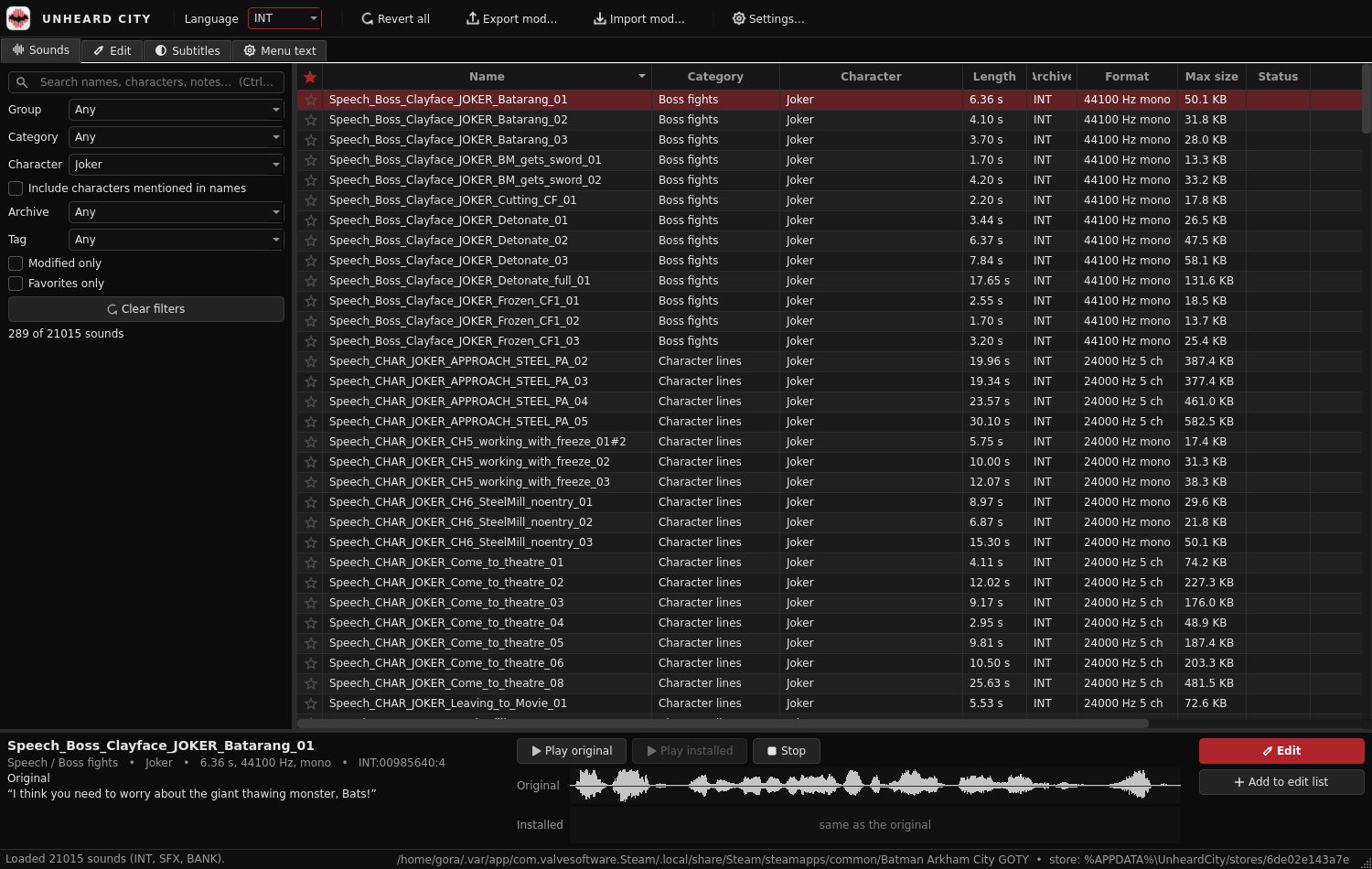 - **Unheard City** (`app/`, [user guide](docs/user-guide.md)): the desktop editor for Windows and Linux. Browse and
search all ~21,000 sounds of one language (its voice lines, music, ambience, and the effects stored inside
soundbanks: footsteps, foley, combat, weapons, UI), filter by category and character, listen; replace or
record in the Edit tab (an edit list, the subtitle shown large, effects for radios, phones, speakers,
announcements...), apply and revert. Edit subtitles (linked to their speech lines) and the menu text in their
own sections. One Language setting (default: the game's) applies to sounds, subtitles and menu text.
- **`ackit`** (`ackit/`): the Python library and command-line tool behind it.
How it works in one paragraph: the game's Wwise 2011.1 decoder only knows the standard Vorbis codebooks, so ackit
encodes with libvorbis and rewrites the stream into exactly the layout the game expects (codebook IDs, packet
format, seek table, header hash and memory size reversed from the game), then writes it in place into the
`.wad` archives, the soundbanks and the game's compressed `.upk` packages (ackit reads and patches them itself),
keeping the original files in a store for exact reverts. Subtitles live in the packages too, menu text in the
localization files. Details in `docs/`.
## Install
- **Editor (users), Windows:** unzip `UnheardCity--windows-amd64.zip` and double-click **Install.cmd**.
It installs for your user (no admin rights), adds a Start menu shortcut and an entry in Settings > Apps for
uninstalling. Or skip installing and run `UnheardCity.exe` straight from the unzipped folder.
- **Editor (users), Linux:** unpack the `.tar.gz` and run `UnheardCity`.
- Nothing else is needed (no Python, no Wwise, no ffmpeg). To build it yourself: [docs/building.md](docs/building.md).
- **Toolkit (developers):** Python 3.10+:
```
python -m venv .venv && .venv/Scripts/activate # Linux: source .venv/bin/activate
pip install -e .[app,dev,verify] # app = editor, dev = tests/packaging, verify = in-game test
python -m app.main # run the editor from source
```
## Quick start (command line)
```
ackit find joker tape # search by name, category or character
ackit extract Speech_TAPE_JOKER_1_04 orig.wav # listen to the original (a line has one name in every language)
ackit replace Speech_TAPE_JOKER_1_04 my_line.wav --match-loudness
ackit fx-template fx.json # effects, all off: set "on" for band-pass EQ, echo, reverb...
ackit replace Speech_TAPE_JOKER_1_04 my_line.wav --fx fx.json
ackit revert Speech_TAPE_JOKER_1_04 # or: ackit revert --all (every sound and text)
ackit text find --lang INT protocol # subtitles and menu texts (keys SUB:... / MENU:...; any of the
# 11 languages, e.g. --lang JPN)
ackit text set "MENU:INT:FRONTEND.int:Buttonpress:DoubleTap" "Tap twice"
```
More: `ackit status`, `ackit list --character Joker`, `ackit export-mod my.acmod` / `ackit import-mod`,
`ackit verify` (offline self-check), `ackit verify --catalog` (catalog vs game files), `ackit game` (detected
install, language, store), `ackit restore-backup` (last resort if the originals store is damaged). `ackit -h` lists all commands. The game folder is found through Steam (Windows, Linux, Flatpak, Proton); otherwise pass `--game DIR`.
Rules worth knowing: speech/effects replacements must fit in the original's size (the tool squeezes or refuses
with the maximum length); music can be any length. Subtitles must fit the original text's length (menu text:
any length). Close the game before writing.
## Where things are
```
ackit/ library + CLI (formats, encoder, injector, catalog, originals store, workspace)
ackit/verify/ offline self-check, in-game test harness (Windows, WinDbg)
app/ Unheard City (PySide6)
tests/ pytest suite (synthetic game data; real-game tests run when the game is installed)
data/catalog/ sound catalogs (CSV), character lists (source/), schema in data/catalog/README.md
docs/ formats, reverse engineering, decisions, categories, user guide, building
tools/ catalog builder, docs figure check, real-game e2e checks (e2e_editor.py, e2e_features.py), packaging
(build_app.py, installer/), artwork, license and screenshot scripts
NOTES.md project status and working notes; CLAUDE.md: guidance for AI sessions
```
Tests: `pytest` (the real-game tests are skipped when the game is not installed). Figures in the docs:
`python tools/check_docs.py [--scan] [--wems]`.
Real-game write round trips (no game launch): `python tools/e2e_features.py [--lang all]`,
`python tools/e2e_editor.py`.
In-game tests (Windows, Steam running, WinDbg installed): `ackit verify --ingame`, `--ingame --banks`,
`--ingame --texts`.
- **Unheard City** (`app/`, [user guide](docs/user-guide.md)): the desktop editor for Windows and Linux. Browse and
search all ~21,000 sounds of one language (its voice lines, music, ambience, and the effects stored inside
soundbanks: footsteps, foley, combat, weapons, UI), filter by category and character, listen; replace or
record in the Edit tab (an edit list, the subtitle shown large, effects for radios, phones, speakers,
announcements...), apply and revert. Edit subtitles (linked to their speech lines) and the menu text in their
own sections. One Language setting (default: the game's) applies to sounds, subtitles and menu text.
- **`ackit`** (`ackit/`): the Python library and command-line tool behind it.
How it works in one paragraph: the game's Wwise 2011.1 decoder only knows the standard Vorbis codebooks, so ackit
encodes with libvorbis and rewrites the stream into exactly the layout the game expects (codebook IDs, packet
format, seek table, header hash and memory size reversed from the game), then writes it in place into the
`.wad` archives, the soundbanks and the game's compressed `.upk` packages (ackit reads and patches them itself),
keeping the original files in a store for exact reverts. Subtitles live in the packages too, menu text in the
localization files. Details in `docs/`.
## Install
- **Editor (users), Windows:** unzip `UnheardCity--windows-amd64.zip` and double-click **Install.cmd**.
It installs for your user (no admin rights), adds a Start menu shortcut and an entry in Settings > Apps for
uninstalling. Or skip installing and run `UnheardCity.exe` straight from the unzipped folder.
- **Editor (users), Linux:** unpack the `.tar.gz` and run `UnheardCity`.
- Nothing else is needed (no Python, no Wwise, no ffmpeg). To build it yourself: [docs/building.md](docs/building.md).
- **Toolkit (developers):** Python 3.10+:
```
python -m venv .venv && .venv/Scripts/activate # Linux: source .venv/bin/activate
pip install -e .[app,dev,verify] # app = editor, dev = tests/packaging, verify = in-game test
python -m app.main # run the editor from source
```
## Quick start (command line)
```
ackit find joker tape # search by name, category or character
ackit extract Speech_TAPE_JOKER_1_04 orig.wav # listen to the original (a line has one name in every language)
ackit replace Speech_TAPE_JOKER_1_04 my_line.wav --match-loudness
ackit fx-template fx.json # effects, all off: set "on" for band-pass EQ, echo, reverb...
ackit replace Speech_TAPE_JOKER_1_04 my_line.wav --fx fx.json
ackit revert Speech_TAPE_JOKER_1_04 # or: ackit revert --all (every sound and text)
ackit text find --lang INT protocol # subtitles and menu texts (keys SUB:... / MENU:...; any of the
# 11 languages, e.g. --lang JPN)
ackit text set "MENU:INT:FRONTEND.int:Buttonpress:DoubleTap" "Tap twice"
```
More: `ackit status`, `ackit list --character Joker`, `ackit export-mod my.acmod` / `ackit import-mod`,
`ackit verify` (offline self-check), `ackit verify --catalog` (catalog vs game files), `ackit game` (detected
install, language, store), `ackit restore-backup` (last resort if the originals store is damaged). `ackit -h` lists all commands. The game folder is found through Steam (Windows, Linux, Flatpak, Proton); otherwise pass `--game DIR`.
Rules worth knowing: speech/effects replacements must fit in the original's size (the tool squeezes or refuses
with the maximum length); music can be any length. Subtitles must fit the original text's length (menu text:
any length). Close the game before writing.
## Where things are
```
ackit/ library + CLI (formats, encoder, injector, catalog, originals store, workspace)
ackit/verify/ offline self-check, in-game test harness (Windows, WinDbg)
app/ Unheard City (PySide6)
tests/ pytest suite (synthetic game data; real-game tests run when the game is installed)
data/catalog/ sound catalogs (CSV), character lists (source/), schema in data/catalog/README.md
docs/ formats, reverse engineering, decisions, categories, user guide, building
tools/ catalog builder, docs figure check, real-game e2e checks (e2e_editor.py, e2e_features.py), packaging
(build_app.py, installer/), artwork, license and screenshot scripts
NOTES.md project status and working notes; CLAUDE.md: guidance for AI sessions
```
Tests: `pytest` (the real-game tests are skipped when the game is not installed). Figures in the docs:
`python tools/check_docs.py [--scan] [--wems]`.
Real-game write round trips (no game launch): `python tools/e2e_features.py [--lang all]`,
`python tools/e2e_editor.py`.
In-game tests (Windows, Steam running, WinDbg installed): `ackit verify --ingame`, `--ingame --banks`,
`--ingame --texts`.